Difference between revisions of "Manual:Main Window"
Jump to navigation
Jump to search
(→Main Window: toolbar options) |
(Main Window default shortcuts) |
||
| (One intermediate revision by the same user not shown) | |||
| Line 1: | Line 1: | ||
| − | |||
= Main Window = | = Main Window = | ||
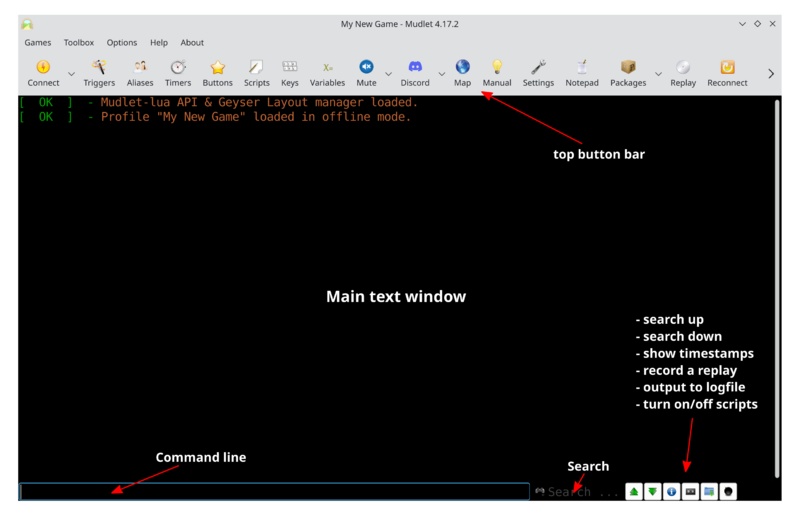
The main window is where you interact with your chosen game. Thanks to Mudlet's graphical user capabilities this window can look vastly different depending on which game you play or how you choose to set it up. The main elements always remain the same though as seen below. | The main window is where you interact with your chosen game. Thanks to Mudlet's graphical user capabilities this window can look vastly different depending on which game you play or how you choose to set it up. The main elements always remain the same though as seen below. | ||
| − | Toolbar preferences including; icons sizes, toggling | + | [[File:Main-screen.png|800px|center|default game screen with descriptions]] |
| + | |||
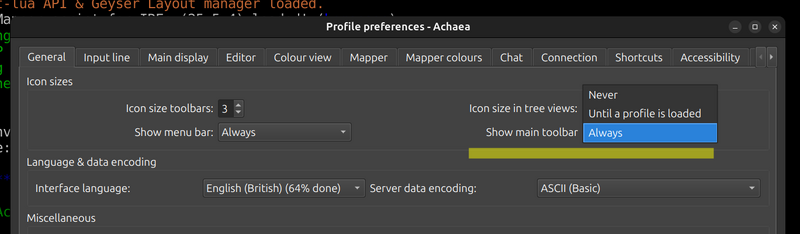
| + | Toolbar preferences including; icons sizes, toggling visibility and other display options can be found under Preferences -> General. | ||
| − | [[File: | + | [[File:Preferences screen showing toolbar options.png|800px|center]] |
| + | |||
| + | == Default Shortcuts == | ||
| + | |||
| + | {| class="wikitable" | ||
| + | |- | ||
| + | | Script editor || (ALT + E) | ||
| + | |- | ||
| + | | Show Map || (ALT + M) | ||
| + | |- | ||
| + | | Compact input line || (ALT + L) | ||
| + | |- | ||
| + | | Preferences || (ALT + P) | ||
| + | |- | ||
| + | | Notepad || (ALT + N) | ||
| + | |- | ||
| + | | Package manager || (ALT + O) | ||
| + | |- | ||
| + | | Module manager || (ALT + I) | ||
| + | |- | ||
| + | | MultiView || (ALT + V) | ||
| + | |- | ||
| + | | Mute all media || (ALT + K) | ||
| + | |- | ||
| + | | Play || (ALT + C) | ||
| + | |- | ||
| + | | Disconnect || (ALT + D) | ||
| + | |- | ||
| + | | Reconnect || (ALT + R) | ||
| + | |- | ||
| + | | Close profile || (ALT + W) | ||
| + | |- | ||
| + | | Toggle Time Stamps || (CTRL + ALT + T) | ||
| + | |- | ||
| + | | Toggle Replay || (CTRL + ALT + R) | ||
| + | |- | ||
| + | | Toggle Logging || (CTRL + ALT + L) | ||
| + | |- | ||
| + | | Toggle Emergency Stop || (CTRL + ALT + S) | ||
| + | |} | ||
[[Category:Mudlet Manual]] | [[Category:Mudlet Manual]] | ||
Latest revision as of 00:19, 29 January 2026
Main Window
The main window is where you interact with your chosen game. Thanks to Mudlet's graphical user capabilities this window can look vastly different depending on which game you play or how you choose to set it up. The main elements always remain the same though as seen below.

Toolbar preferences including; icons sizes, toggling visibility and other display options can be found under Preferences -> General.

Default Shortcuts
| Script editor | (ALT + E) |
| Show Map | (ALT + M) |
| Compact input line | (ALT + L) |
| Preferences | (ALT + P) |
| Notepad | (ALT + N) |
| Package manager | (ALT + O) |
| Module manager | (ALT + I) |
| MultiView | (ALT + V) |
| Mute all media | (ALT + K) |
| Play | (ALT + C) |
| Disconnect | (ALT + D) |
| Reconnect | (ALT + R) |
| Close profile | (ALT + W) |
| Toggle Time Stamps | (CTRL + ALT + T) |
| Toggle Replay | (CTRL + ALT + R) |
| Toggle Logging | (CTRL + ALT + L) |
| Toggle Emergency Stop | (CTRL + ALT + S) |