Compiling Mudlet
If you just want to use Mudlet, you can skip these steps, and use one of the already ready (pre-compiled) installers ready for download. These instructions are for those who want to build Mudlet themselves, to use the latest development branch features or contribute to Mudlet development.
Otherwise, hop in for new adventure! And if you would rather have an AI coding agent do the building and contributing for you, see Improving Mudlet with AI agents.
Need a hand at any point? Join us on Mudlet's Discord or forums.

Quick start
Mudlet builds the same way on every platform. Install the dependencies for your operating system (see #Installing dependencies), then:
git clone --recursive -b development https://github.com/Mudlet/Mudlet.git
cd Mudlet

cmake --list-presets                 # shows the presets that apply on this machine
cmake --preset linux-debug           # configure  (macos-debug / windows-debug on those platforms)
cmake --build --preset linux-debug   # build - allow up to 10 minutes for a full build
ctest --preset linux-debug           # run the C++ test suite

./build/src/mudlet                                # Linux, Windows (mudlet.exe)
./build/src/mudlet.app/Contents/MacOS/mudlet      # macOS
That is the whole build. There is no need to create a build directory, pick a generator or remember flags: CMakePresets.json in the repository root encodes the generator (Ninja), the build type (Debug) and the sanitizer settings for each platform.
Requirements (checked by CMakeLists.txt):
- CMake 3.25.1 or newer - an older CMake rejects
--presetwith an unhelpful "unknown argument" error, so checkcmake --versionfirst. - Qt 6.8.2 or newer. Mudlet no longer builds with Qt 5.
- A C++20 compiler (GCC 12+, Clang 15+, AppleClang from a current Xcode).
- Lua 5.1 and a handful of Lua rocks - see #Lua rocks.
Finding Qt. The presets do not pin a Qt location. A Qt installed by your distribution or by Homebrew is found automatically. If you installed Qt some other way (the Qt online installer, aqtinstall) tell CMake where it is once, at configure time:
cmake --preset linux-debug -DCMAKE_PREFIX_PATH=$HOME/Qt/6.9.0/gcc_64
cmake --preset macos-debug -DCMAKE_PREFIX_PATH="$(brew --prefix qt6)"
This is the only platform-specific knob most people ever need; it is the same variable in every IDE section below.
Build variants
Every developer preset has a matching build and test preset of the same name, so cmake --build --preset X and ctest --preset X always act on the tree that cmake --preset X produced. The plain <platform>-debug presets build into build/; every variant builds into build-<preset-name>/, so several configurations can coexist without forcing each other to rebuild.
| Preset | Platform | Notes |
|---|---|---|
linux-debug / macos-debug |
Linux / macOS | Ninja, Debug, AddressSanitizer on. The default for development. |
windows-debug |
Windows | MSYS2 CLANG64, Ninja, Debug. No sanitizers on Windows. |
<platform>-debug-nosan |
Linux / macOS | No sanitizers - noticeably faster to build and to run. Use this when not chasing a memory bug. |
<platform>-debug-tsan |
Linux / macOS | ThreadSanitizer instead of AddressSanitizer. |
<platform>-debug-ubsan |
Linux / macOS | UndefinedBehaviorSanitizer. |
<platform>-static-analysis |
Linux / macOS | Runs clang-tidy and cppcheck during compilation - see #Static analysis. |
linux-lowspec |
Linux | No sanitizers, no updater, no 3D mapper, 2 parallel jobs. For Raspberry Pi and other low-memory machines. |
<platform>-release |
all | Release build, no sanitizers - the flags CI ships to players. Use it when the speed or size of the binary is what you are measuring; a Debug binary is unoptimised and several times larger, so timings taken on one say little about the shipped client. |
ci-linux, ci-macos, ci-windows, ci-codeql |
all | What the GitHub Actions workflows configure with. They read CMAKE_BUILD_TYPE, USE_SANITIZER and WITH_SENTRY from the environment and build into ../b/ninja beside the checkout. Reach for them to reproduce a CI failure, not for day-to-day work.
|
Sanitizers are on by default. Every non-Windows build enables AddressSanitizer regardless of build type (USE_SANITIZER defaults to address), and a Release build type alone does not turn it off - the -release and -nosan presets clear it explicitly. See #Sanitizers for combining them.
Optional feature modules. The updater, bundled fonts and the 3D mapper are switched with CMake options -DUSE_UPDATER=OFF, -DUSE_FONTS=OFF and -DUSE_3DMAPPER=OFF. The matching WITH_* names are read from the environment only, so -DWITH_UPDATER=NO on the command line is accepted and silently ignored.
Installing
Installation is optional - the binary runs fine from the build tree. To install system-wide on Linux:
sudo cmake --install build
and to reverse it:
sudo rm -fr /usr/local/bin/mudlet /usr/local/share/mudlet /usr/local/share/applications/mudlet.desktop \
  /usr/local/share/icons/hicolor/scalable/apps/mudlet.svg /usr/local/share/icons/hicolor/512x512/apps/mudlet.png
(Substitute /usr for /usr/local if you configured with -DCMAKE_INSTALL_PREFIX=/usr.)
Installing dependencies
Ubuntu and Debian
Also covers Ubuntu flavours and derivatives (Kubuntu, KDE Neon, Pop!_OS, Linux Mint), Raspberry Pi OS and the Linux container on Chrome OS. Make sure the Universe repository is enabled on Ubuntu (it is by default).
1. Build tools and libraries
sudo apt install build-essential git cmake ninja-build ccache pkg-config \
  lua5.1 liblua5.1-0-dev luarocks \
  libassimp-dev libboost-dev libcurl4-openssl-dev libgl1-mesa-dev libglu1-mesa-dev \
  libhunspell-dev libonig-dev libpcre2-dev pcre2-utils libpugixml-dev libpulse-dev \
  libsecret-1-dev libspeechd-dev libsqlite3-dev libssl-dev libxkbcommon-dev \
  libxkbcommon-x11-0 libxcb-image0-dev libxcb-render-util0-dev libyajl-dev libzip-dev \
  libzstd-dev mesa-common-dev qtkeychain-qt6-dev openssl ca-certificates
2. Qt 6.8.2 or newer
Ubuntu 25.04 and later, Debian 13 and later package a new enough Qt:
sudo apt install qt6-base-dev qt6-multimedia-dev qt6-5compat-dev qt6-tools-dev \
  qt6-tools-dev-tools qt6-l10n-tools qt6-speech-dev qt6-svg-dev libqt6opengl6-dev
Ubuntu 24.04 and older, Debian 12 and older ship Qt 6.4 or earlier, which is too old. Install Qt from the Qt online installer or with aqtinstall (the same tool CI uses) and pass its location to CMake:
python3 -m venv ~/aqt && ~/aqt/bin/pip install aqtinstall
~/aqt/bin/aqt install-qt linux desktop 6.9.0 linux_gcc_64 -O ~/Qt -m qt5compat qtmultimedia qtspeech

cmake --preset linux-debug -DCMAKE_PREFIX_PATH=~/Qt/6.9.0/gcc_64
The distribution's qtkeychain-qt6-dev is built against the older system Qt; that is fine, Qt guarantees binary compatibility across 6.x minor releases and CI relies on the same mix.
3. Lua rocks - see #Lua rocks.
4. Build - see #Quick start.
Raspberry Pi and other low-memory machines
Follow the Ubuntu and Debian steps, then configure with the linux-lowspec preset instead of linux-debug. It turns off sanitizers, the updater and the 3D mapper and limits the build to two parallel jobs, which is what a 4GB Raspberry Pi 4 can sustain while remaining usable (expect roughly 35 minutes). On a smaller Pi, run cmake --build --preset linux-lowspec -j 1 and expect more than an hour.
Optional extras
Building from source uses the system's own audio libraries and lets Qt pick up the desktop's widget style, which the AppImage cannot. On GTK-based desktops (GNOME, XFCE, MATE, Budgie) Qt theming does not "just work" - sudo apt install qt6ct installs a tool for configuring the look and feel of Qt programs there. KDE Plasma and LXQt users can use their desktop's own settings.
Wayland
Mudlet runs on Wayland, but there are some quirks with key bindings (the numpad may not work as expected). Until that is resolved you may wish to start Mudlet with:
QT_QPA_PLATFORM=xcb mudlet
(or change the Exec= line in /usr/share/applications/mudlet.desktop).
macOS
1. Install prerequisites
Install Xcode, its command line tools (xcode-select --install) and Homebrew. Then:
brew doctor
brew update
brew install git cmake ninja ccache qt6 qtkeychain [email protected] luarocks \
  libzzip libzip assimp hunspell oniguruma pcre2 pugixml sqlite yajl boost \
  zstd curl openssl
Homebrew's llvm is only needed for static analysis and clang-format; it is keg-only, so it does not shadow AppleClang.
2. Lua rocks
Homebrew's pcre2 is keg-only and several rocks compile against C libraries, so tell luarocks where to find them:
LR="luarocks --lua-version 5.1 install --local"
$LR luafilesystem
$LR lpeg
$LR luautf8
$LR lua-yajl        YAJL_DIR="$(brew --prefix yajl)"
$LR lrexlib-pcre2   PCRE2_DIR="$(brew --prefix pcre2)"
$LR lua-zip         ZIP_DIR="$(brew --prefix libzip)"
$LR luasql-sqlite3 2.6.1 SQLITE_DIR="$(brew --prefix sqlite)"
Then make the rocks visible to Mudlet and to the build (add this to your shell profile):
eval "$(luarocks path --local --lua-version 5.1)"
3. Build
git clone --recursive -b development https://github.com/Mudlet/Mudlet.git
cd Mudlet
cmake --preset macos-debug -DCMAKE_PREFIX_PATH="$(brew --prefix qt6)"
cmake --build --preset macos-debug
open build/src/Mudlet.app
If CMake cannot find PCRE2, add PKG_CONFIG_PATH="$(brew --prefix pcre2)/lib/pkgconfig" to the environment before configuring.
Note: on macOS the build copies src/mudlet-lua into the .app bundle and that copy is what runs, so editing Lua under src/ needs a rebuild to take effect (on Linux it is read from disk).
Windows
Builds run under MSYS2 in the CLANG64 environment. The setup script accepts only that environment and exits on any other, so do not use the MINGW64 or MSYS shells, and make sure it is a real MSYS2 shell - Git for Windows' bash can carry an inherited MSYSTEM that makes it look like one (MSYSTEM_PREFIX is empty in that case).
- Install MSYS2 from https://www.msys2.org and run MSYS2 CLANG64 from the start menu.
- In that terminal (right-click to paste):
pacman -Syu --noconfirm
pacman -S --needed git --noconfirm
git clone --recursive -b development https://github.com/Mudlet/Mudlet.git
./Mudlet/CI/setup-windows-sdk.sh       # installs Qt, the toolchain, every library and Lua rock (~5-10 min)
The script ends by printing LUA_PATH and LUA_CPATH values; export them in your shell (or add them to your IDE's build environment) so Mudlet finds the rocks at runtime.
- Build and run:
cd Mudlet
cmake --preset windows-debug
cmake --build --preset windows-debug
./build/src/mudlet.exe
The preset reads MSYSTEM_PREFIX, which MSYS2 sets in each of its shells, so it always uses the environment you are in. windows-release builds the Release configuration into build-windows-release/, matching what CI ships.
 Note: On Windows ARM64 the native environment is CLANGARM64, which the setup script does not handle yet; run it from a CLANG64 shell (x86_64 emulation).
Qt Creator: install it with pacman -S mingw-w64-clang-x86_64-qt-creator and launch it from the CLANG64 shell (qtcreator.exe) so it inherits the environment. Open the repository's CMakeLists.txt as the project and choose the windows-debug preset when Qt Creator offers the configurations it found in CMakePresets.json.
Fedora
Note: Package list updated for Qt 6 from the earlier aarch64 instructions; please report any package that is missing or misnamed.
sudo dnf group install "development-tools" "development-libs"
sudo dnf install cmake ninja-build ccache git \
  compat-lua compat-lua-devel compat-lua-libs luarocks \
  qt6-qtbase-devel qt6-qt5compat-devel qt6-qtmultimedia-devel qt6-qttools-devel \
  qt6-qtspeech-devel qt6-qtsvg-devel qtkeychain-qt6-devel \
  assimp-devel boost-devel hunspell-devel libcurl-devel libsecret-devel libzip-devel \
  libzstd-devel oniguruma-devel openssl-devel pcre2-devel pugixml-devel pulseaudio-libs-devel \
  speech-dispatcher-devel sqlite-devel yajl-devel mesa-libGLU-devel ca-certificates
Then install the #Lua rocks with luarocks --lua-version 5.1 and build as in #Quick start.
To see qDebug() output, disable a default Fedora logging rule:
export QT_LOGGING_RULES='*.debug=true'
Arch Linux
Mudlet is in the Arch User Repository as mudlet (release) and mudlet-git (development branch), for example yay -S mudlet-git. To build by hand instead:
Note: Package list updated for Qt 6 from the earlier Qt 5 instructions; please report any package that is missing or misnamed.
sudo pacman -S --needed base-devel git cmake ninja ccache \
  qt6-base qt6-5compat qt6-multimedia qt6-tools qt6-speech qt6-svg qtkeychain-qt6 \
  lua51 lua51-filesystem lua51-lpeg luarocks \
  assimp boost hunspell libzip oniguruma pcre2 pugixml sqlite yajl zstd curl openssl ca-certificates glu
Arch's luarocks targets the system Lua 5.4, so install the remaining #Lua rocks for 5.1 explicitly:
for rock in luautf8 lua-yajl lrexlib-pcre2 lua-zip; do
  sudo luarocks --lua-version 5.1 install $rock
done
sudo luarocks --lua-version 5.1 install luasql-sqlite3 2.6.1
Then build as in #Quick start. The Discord library is bundled under 3rdparty/discord; no separate build is needed.
FreeBSD
Verified on FreeBSD 14 and 15 (February 2024). Please reach out to erikarn ([email protected]) with updates or questions.
# as root
pkg install git lua51 lua51-luarocks cmake ninja qt6 pugixml sqlite3 yajl boost-libs qtkeychain-qt6 zstd assimp curl
for rock in luautf8 luafilesystem lua-zip lrexlib-pcre2 lua-yajl lpeg; do luarocks51 install $rock; done
luarocks51 install luasql-sqlite3 2.6.1
The presets are conditioned on Linux, macOS and Windows hosts, so on FreeBSD configure directly:
git clone --recursive -b development https://github.com/Mudlet/Mudlet.git
cmake -S Mudlet -B Mudlet/build -G Ninja -DCMAKE_BUILD_TYPE=Debug -DUSE_SANITIZER=""
cmake --build Mudlet/build
sudo cmake --install Mudlet/build
Gentoo
An overlay containing Mudlet is available.
GitHub Codespaces
GitHub Codespaces lets you build and run Mudlet from the browser on any computer. The repository ships a .devcontainer that installs the toolchain and a lightweight web desktop.
1. Create a new codespace at https://github.com/Mudlet/Mudlet: click the green "Code" button, select the "Codespaces" tab and click "New codespace". Use Chrome or Edge; Firefox's clipboard integration is unreliable.

2. Wait for it to load (~5 minutes).
3. Connect to the desktop. In the Ports panel, set the Open Mudlet port (6080) to Public, then click its web icon and log in with the password mudlet. If it refuses to connect, check the port is Public and retry a few times.

4. Build. Open the command palette and choose CMake: Select Configure Preset → linux-debug-nosan, then press F7. The first build takes ~25 minutes on the basic instance; later builds are much faster thanks to ccache.
5. Run. Press the play button at the bottom of the window; Mudlet appears in the desktop tab.
A codespace disconnects after a period of inactivity, never while you are using it.
Docker
Note: The docker/ setup is unmaintained: its Ubuntu 22.04 base only offers Qt 6.2 from apt, which is older than Mudlet's 6.8.2 minimum, so it cannot build the current source. Use the Codespaces devcontainer above, or a native build.
Lua rocks
Mudlet embeds a Lua 5.1 interpreter and relies on a handful of modules from LuaRocks. Some distributions package a few of them (Debian's lua-filesystem, lua-zip, lua-sql-sqlite3, Arch's lua51-filesystem); the rest are installed with luarocks. On any system with more than one Lua, always pass --lua-version 5.1.
for rock in luafilesystem lpeg luautf8 lua-yajl lrexlib-pcre2 lua-zip; do
  sudo luarocks --lua-version 5.1 install $rock
done
sudo luarocks --lua-version 5.1 install luasql-sqlite3 2.6.1
lua-yajlis needed at build time, not just at runtime: the build uses it to generate translation statistics. Without it you will seewarning: lua-yajl not available - translation statistics in settings won't be shownin the build log and, at runtime, errors such asGeyserAdjustableContainer.lua: attempt to index field 'Locale' (a nil value).luasql-sqlite3must stay at 2.6.1: 2.8.0 breaksDB.lua'sPRAGMA table_infohandling.lcfis bundled under3rdparty/lcfand no longer needs installing.- If you install with
--localrather thansudo, runeval "$(luarocks path --local --lua-version 5.1)"in the shell that configures, builds and runs Mudlet (put it in your shell profile). - The test suites additionally need
busted,argparseandlunajson.
Included modules
- luautf8 (manual in README)
- lcf (customised version, bundled)
- luafilesystem (manual)
- lrexlib-pcre2 (manual)
- luasql-sqlite3 (manual)
- lua-yajl (manual)
- lua-zip (manual)
- lpeg (manual)
Adding a rock of your own
Any rock installed for Lua 5.1 is available to Mudlet scripts via require, provided it is on Mudlet's Lua search path. Check where luarocks put it and what the paths are:
luarocks --lua-version 5.1 install bit32
luarocks --lua-version 5.1 show bit32          # "Modules:" lists the installed .so/.lua
luarocks --lua-version 5.1 path --no-bin       # the LUA_PATH / LUA_CPATH Mudlet needs
From inside Mudlet, lua print(package.path) and lua print(package.cpath) show what it is actually searching. If the rock's directory is missing, export the values from luarocks path before starting Mudlet. Then test it:
bit32 = require("bit32")
print(bit32.band(0, 1))
Testing
Two harnesses exist, and both are worth running before opening a pull request.
C++ functional tests (ctest), against the tree the preset built:
ctest --preset linux-debug            # or whichever preset you built
QT_QPA_PLATFORM=offscreen ctest --preset linux-debug   # headless
The tests load LuaGlobal.lua, so the #Lua rocks must be on LUA_PATH/LUA_CPATH; if a dozen tests fail with attempt to index global 'yajl' or 'rex', that is the cause.
Lua specs (busted, in src/mudlet-lua/tests/*_spec.lua) run inside the self-test profile exactly as CI's "Run Lua tests" step does. On Linux:
sudo apt install xvfb
luarocks --lua-version 5.1 install busted
.claude/scripts/run-lua-tests.sh build/src/mudlet   # defaults to build-linux-debug-nosan/src/mudlet if no path is given
On Linux a change confined to src/mudlet-lua/lua/ or the specs needs no rebuild at all - Mudlet reads those from disk at startup - so any Mudlet binary already built on the machine can run this checkout's Lua. (Exceptions: src/packages/ and utf8_filenames.lua are compiled in as Qt resources, and macOS bundles a copy of mudlet-lua into the .app.)
Both harnesses fail silently rather than red when their setup is wrong, so confirm a new test fails without your fix before trusting it.
Sanitizers
Clang and GCC sanitizers catch memory and threading bugs that otherwise show up as mysterious crashes:
- AddressSanitizer - out-of-bounds accesses, use-after-free and most other memory errors
- LeakSanitizer - memory leaks
- UndefinedBehaviourSanitizer - misaligned or null pointers, overflowing conversions, division by zero and other undefined behaviour
- MemorySanitizer - reads of uninitialised memory
- ThreadSanitizer - data races
AddressSanitizer is on by default in every non-Windows build; the -tsan, -ubsan and -nosan presets change the choice. For a combination the presets do not cover, pass USE_SANITIZER as a CMake list - semicolon-separated, not comma-separated:
cmake --preset linux-debug -DUSE_SANITIZER="Address;Undefined"
A comma-separated value is read as a single unknown name, which silently drops the per-sanitizer options such as -fno-omit-frame-pointer.
Usable names are Address, Thread and Undefined on macOS, plus Memory and Leak on Linux. (MemoryWithOrigins appears in the variable's help text but has no mapping and always fails.) Not all sanitizers can be combined; an unavailable or incompatible selection stops configuration with an error.
Because CLion, VS Code and Qt Creator all read CMakePresets.json, selecting one of the sanitizer presets in the IDE is all that is needed - there is no per-IDE sanitizer configuration.
Static analysis
Mudlet integrates clang-tidy and cppcheck; both run during a normal compilation when enabled and neither fails the build.
1. Install the tools
| macOS | brew install llvm cppcheck - Homebrew's llvm is keg-only, so put $(brew --prefix llvm)/bin on PATH for the configure step
|
| Ubuntu / Debian | sudo apt install clang-tidy cppcheck
|
| Arch | sudo pacman -S clang cppcheck
|
| Fedora | sudo dnf install clang-tools-extra cppcheck
|
| Windows (MSYS2 CLANG64) | pacman -S mingw-w64-clang-x86_64-clang-tools-extra mingw-w64-clang-x86_64-cppcheck
|
2. Configure with the static-analysis preset and build, capturing the output
cmake --preset linux-static-analysis            # or macos-static-analysis
cmake --build --preset linux-static-analysis 2>&1 | tee mudlet_static_analysis.log
(On Windows, pass -DENABLE_STATIC_ANALYSIS=ON to cmake --preset windows-debug instead; in PowerShell pipe through Tee-Object -FilePath.)
The two tools are independent: whichever is on PATH runs. A missing clang-tidy produces a CMake warning, but a missing cppcheck only prints a STATUS line, so check the configure output rather than assuming both ran.
3. Filter the results to Mudlet's own sources
grep -E "warning:" mudlet_static_analysis.log | grep -v 3rdparty | grep -v "ld: warning" | sort -u
The checks (performance-*, bugprone-*, clang-analyzer-*) are defined in .clang-tidy at the root of the repository.
Setting up IDEs
All three IDEs below read CMakePresets.json natively: open the repository's top-level CMakeLists.txt and pick a preset. If Qt is not on the default search path, add -DCMAKE_PREFIX_PATH=<your Qt> to the IDE's CMake options, exactly as on the command line. The tell-tale error is:
By not providing "FindQt6.cmake" in CMAKE_MODULE_PATH this project has
asked CMake to find a package configuration file provided by "Qt6", but
CMake did not find one.
Each IDE also needs to be pointed at the repository's .clang-format and .clang-tidy files (both at the repository root) so that formatting and lint match what CI enforces.
CLion
- CMake: Settings → Build, Execution, Deployment → CMake. Enable the preset you want; add
-DCMAKE_PREFIX_PATH=...under CMake options if needed, e.g.-DCMAKE_PREFIX_PATH=/home/vadi/Qt/6.9.0/gcc_64/.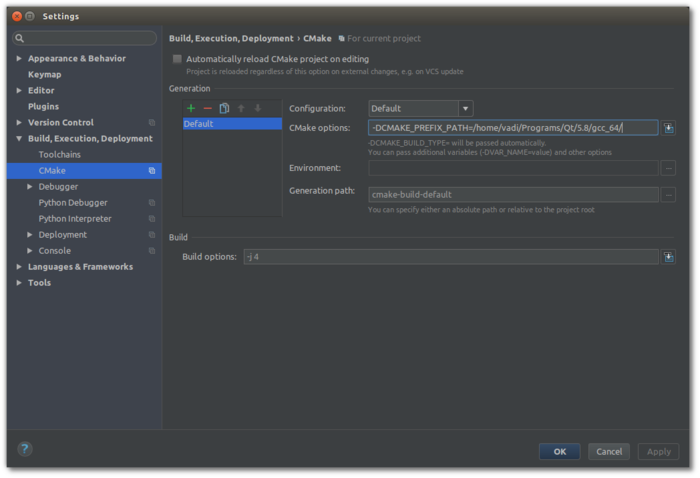
- Windows: use the MSYS2 CLANG64 toolchain (
C:\msys64\clang64) rather than a MinGW one, after runningCI/setup-windows-sdk.shas in #Windows. - Clang-Tidy: enable Prefer .clang-tidy files over IDE settings.
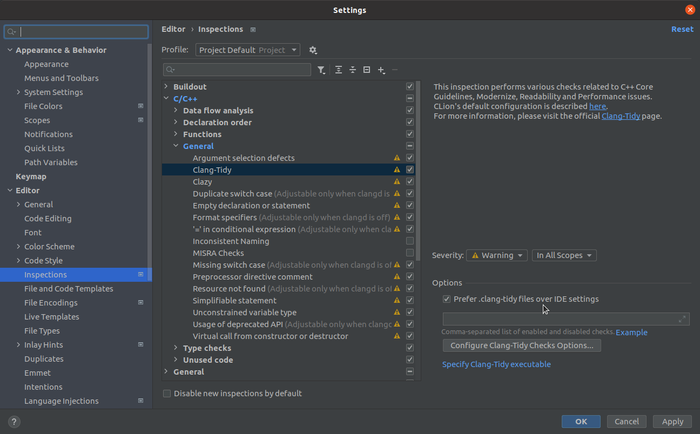
- ClangFormat: enable ClangFormat so the repository's
.clang-formatis used.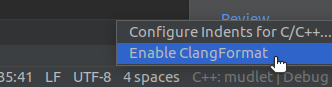


CLion and WSL
There are two ways to use the Windows Subsystem for Linux with CLion: run the IDE on Windows and build inside WSL through a WSL toolchain, or use Remote Development with a thin client. Either way, install WSL with the Ubuntu distribution and follow #Ubuntu and Debian inside it - including installing Qt from the Qt online installer or aqtinstall if the WSL distribution's Qt is older than 6.8.2.
For Remote Development, check the repository out inside the WSL filesystem, open it from CLion's Remote Development tab, select WSL, and set CMAKE_PREFIX_PATH in the CMake profile.


For a WSL toolchain, create the toolchain and then a CMake profile that uses it:


Visual Studio Code
Install the CMake Tools extension. It offers the presets from CMakePresets.json in the status bar; choose a configure preset and press F7. If Qt is not found, open settings, search for cmake environment and set CMAKE_PREFIX_PATH, e.g. /home/vadi/Qt/6.9.0/gcc_64:

Clang-Tidy: run it by selecting Analysis from the command palette (Ctrl+Shift+P):

You can also check the status of an analysis and cancel it.
Qt Creator
Open CMakeLists.txt as a project; Qt Creator lists the presets as build configurations.
Clang-Tidy and Clazy: see Qt Creator's instructions. Point clang-tidy at the repository's .clang-tidy; for clazy enable the level0 and level1 checks.


ClangFormat: in the C++ settings, use the .clang-format style, turn on Format instead of indenting so Ctrl+I formats code, and make sure Override Clang Format configuration file is disabled:

Debugging
The -debug presets already build with debug information and without optimisation, so there is nothing to change to run Mudlet under a debugger:
gdb --args ./build/src/mudlet                          # Linux
lldb ./build/src/mudlet.app/Contents/MacOS/mudlet      # macOS
Type run, reproduce the crash, then bt and attach the output to your bug report. Sanitizer reports are printed to the terminal when the offending code runs; the -nosan presets give a faster binary when you do not need them.
Compile-time debugging defines for protocol decoding (DEBUG_UTF8_PROCESSING, DEBUG_SGR_PROCESSING, DEBUG_MXP_PROCESSING and the rest) are documented in docs/platform-builds.md in the repository.
Troubleshooting
'LUA_GLOBALSINDEX' was not declared in this scope - CMake picked up Lua 5.2 or later. Mudlet uses Lua 5.1 only; point it at the right headers with -DLUA_INCLUDE_DIR=/usr/include/lua5.1 (adjust to your system).
Could not find Discord library - searched in: ... - the bundled library under 3rdparty/discord/rpc/lib/ is not on the loader path. Add it (export LD_LIBRARY_PATH=$LD_LIBRARY_PATH:/path/to/Mudlet/3rdparty/discord/rpc/lib/) and restart Mudlet; you should then see Discord integration loaded. On Apple Silicon, libdiscord-rpc.dylib is a universal binary and needs no extra step.
module 'yajl' not found during the build or at runtime - install the lua-yajl rock for Lua 5.1 (see #Lua rocks). On macOS pass YAJL_DIR="$(brew --prefix yajl)"; if luarocks still cannot build it, build YAJL from source with ./configure && sudo make install and retry.
Configure fails with a generator mismatch - CMake cannot switch generator in an existing build directory. Delete the directory (or use a different preset, which uses its own) and configure again.
Branch switches rebuild everything - ccache is wired in automatically whenever it is installed, but a full cache evicts continuously. Run ccache -s; if Cache size has reached Max cache size, raise it with ccache -M 20G.
The machine thrashes during a build - never run cmake --build . --parallel without a job count in a Makefiles tree: a bare --parallel passes -j with no number to make, which starts as many compilers as the dependency graph allows. The presets use Ninja, which bounds the job count by default; on a low-memory machine use linux-lowspec or pass -j 2.
Numpad keys do nothing on Wayland - see #Wayland.
Contributing
developmentis the branch new work goes to. Fork the repository and open a pull request against it (GitHub tutorial). See CONTRIBUTING.md for the coding standards and the policy on AI-assisted changes.- Run
clang-format -ion every C++ file you touch (on macOS:$(brew --prefix llvm)/bin/clang-format). The style is .clang-format at the repository root. - Package versions shipped by Linux distributions are tracked at https://repology.org/project/mudlet/versions - you may want to upgrade these.
Testing in-progress PRs
If you are testing Mudlet PRs and find yourself downloading test builds often, two scripts automate it: run them regularly and every testable PR is already built or downloaded, so you can go through them in bulk.
1. Create a new, separate checkout of the Mudlet repository (separate from your development checkout):
git clone https://github.com/Mudlet/Mudlet.git
2. Install the GitHub CLI and log in:
gh auth login
3a. To compile all Mudlet PRs (slow or metered connection, fast computer): build-pr-worktrees.sh. Ready-to-use Mudlets appear in ./builds/pr-<number>/:
./build-pr-worktrees.sh                    # all ready-for-review PRs
./build-pr-worktrees.sh --include-drafts   # also drafts
./build-pr-worktrees.sh --cleanup          # remove folders of merged PRs
3b. To download pre-built PRs instead (fast connection, slow computer): download-pr-artifacts.sh. Builds appear in ./artifacts/pr-<number>/:
./download-pr-artifacts.sh
./download-pr-artifacts.sh --include-drafts
./download-pr-artifacts.sh --include-drafts --jobs 20   # N downloads at a time (default 8)
./download-pr-artifacts.sh --cleanup